



SCORM Accessibility
Online training materials are required to provide an equivalent and accessible experience to persons with disabilities. Word Wizards now offers validation and remediation for SCORM courses and content. We provide expert review of e-learning modules against WCAG criteria, delivering a comprehensive checklist of accessibility compliance. Learners using screen readers, captions, keyboard navigation, and other assistive technology rely on these digital accessibility standards to ensure they receive the full educational experience while using SCORM packages.
Get a QuoteWhat Is SCORM?
SCORM, the Sharable Content Object Reference Model, is the standard way of packaging e-learning modules. A SCORM package bundles HTML, CSS, JavaScript, video, quizzes, and interactions into a single course that runs in nearly any learning management system, on any browser or operating system. Portability is the problem SCORM solves. Accessibility is the challenge that remains: a course that runs everywhere still has to work for everyone, regardless of ability.
Consider a training video showing how germs spread through a dental office, with narration describing contaminated surfaces. A learner who cannot see the screen hears about the risk but has no way to identify which surfaces are shown. A learner who cannot hear the narration sees the surfaces without knowing why they matter. The module needs both a transcript of the dialogue and audio description of the visuals before every learner receives the same lesson. Challenges like this run through every layer of a SCORM package, and most of them are invisible until someone tests for them.
Contact UsSCORM Content Accessibility
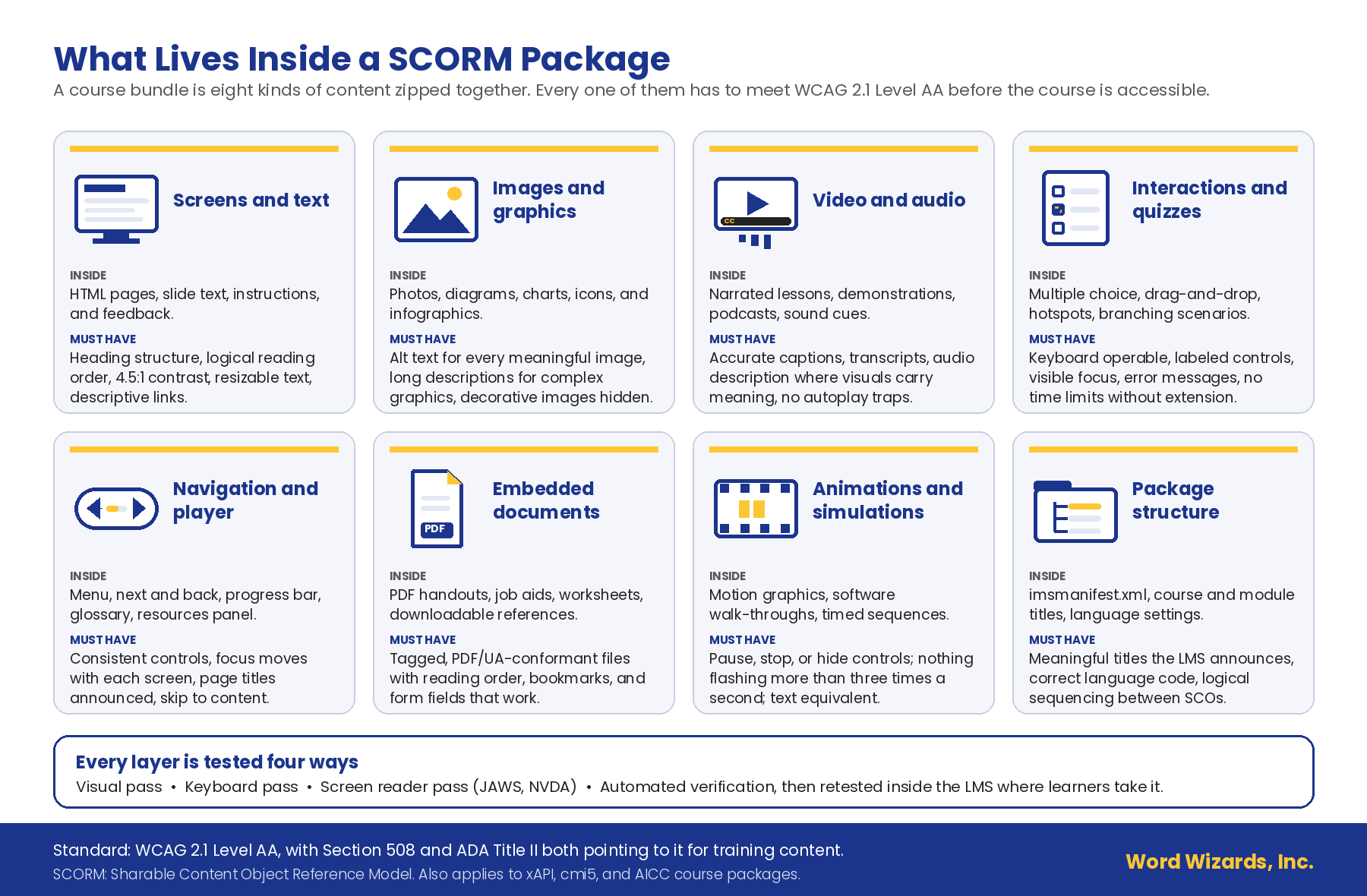
Every element of a course bundle must be accessible to persons with disabilities. The graphic below maps the eight kinds of content that can be found in a typical SCORM package to what each one must provide.
Text version of the “What Lives Inside a SCORM Package” infographic
What Lives Inside a SCORM Package. A course bundle is eight kinds of content zipped together. Every one of them has to meet WCAG 2.1 Level AA before the course is accessible.
- Screens and text. Inside: HTML pages, slide text, instructions, and feedback. Must have: heading structure, logical reading order, 4.5:1 contrast, resizable text, descriptive links.
- Images and graphics. Inside: photos, diagrams, charts, icons, and infographics. Must have: alt text for every meaningful image, long descriptions for complex graphics, decorative images hidden.
- Video and audio. Inside: narrated lessons, demonstrations, podcasts, sound cues. Must have: accurate captions, transcripts, audio description where visuals carry meaning, no autoplay traps.
- Interactions and quizzes. Inside: multiple choice, drag-and-drop, hotspots, branching scenarios. Must have: keyboard operable, labeled controls, visible focus, error messages, no time limits without extension.
- Navigation and player. Inside: menu, next and back, progress bar, glossary, resources panel. Must have: consistent controls, focus moves with each screen, page titles announced, skip to content.
- Embedded documents. Inside: PDF handouts, job aids, worksheets, downloadable references. Must have: tagged, PDF/UA-conformant files with reading order, bookmarks, and form fields that work.
- Animations and simulations. Inside: motion graphics, software walk-throughs, timed sequences. Must have: pause, stop, or hide controls; nothing flashing more than three times a second; text equivalent.
- Package structure. Inside: imsmanifest.xml, course and module titles, language settings. Must have: meaningful titles the LMS announces, correct language code, logical sequencing between SCOs.
Every layer is tested four ways: visual pass, keyboard pass, screen reader pass (JAWS, NVDA), automated verification, then retested inside the LMS where learners take it.
Standard: WCAG 2.1 Level AA, with Section 508 and ADA Title II both pointing to it for training content. SCORM: Sharable Content Object Reference Model. Also applies to xAPI, cmi5, and AICC course packages.
SCORM Accessibility Validation
Full service accessibility compliance validation follows a structured, multi-pass methodology, and every finding lands in a documented checklist your team can act on:
- Visual pass. A full review of the module as a sighted mouse user experiences it, including color contrast checks on every screen.
- Keyboard pass. Complete navigation without a mouse, confirming that every interaction works and that no screen traps the learner.
- Screen reader pass. Verification of alternative text, reading order, and heading structure as assistive technology actually presents them.
- Automated verification. Tools such as ANDI confirm page language, titles, and the findings from the manual passes.
The result is a validated SCORM accessibility checklist: a checkpoint-by-checkpoint record of what passes, what fails, and how each fix should be applied. Course designers can remediate in house with our findings, or hand the fixes to our remediation production team to handle the most difficult compliance issues within the content.
What SCORM Compliance Covers
Accessibility problems hide in every layer of a course bundle. Our practitioners work through all of them:
- Course content remediation. Reading order, headings, color contrast, alternative text, and link clarity across every screen of the module.
- Accessible interactions and assessments. Quizzes, drag-and-drop activities, branching scenarios, and knowledge checks rebuilt so keyboard and screen reader users can complete them independently.
- Media accessibility. Captioning for embedded video, audio description where visuals carry meaning, and transcripts for audio content, produced by the same team that handles broadcast and federal media work.
- LMS delivery testing. Verification with JAWS, NVDA, and keyboard-only navigation inside the learning environment, because a course that tests clean in the authoring tool can still fail where learners actually take it.
- Conformance reporting. Documented ACR/VPAT reporting for your courses, giving procurement and compliance teams the record they need.
Three Ways to Engage Word Wizards
GSA Schedule. Federal agencies and other eligible buyers can order directly through our GSA Multiple Award Schedule, contract GS-07F-0641X, with pre-negotiated rates and no separate competition.
Cooperative contracts. State and local governments, school districts, and higher education institutions can purchase through our competitively awarded cooperative contracts on Civic Marketplace, available through Edge Public, with no new RFP required.
Direct engagement. Corporations, nonprofits, and training providers can work with us directly. Start with a single course review or scope a full library; every engagement begins with a conversation and a written quote.
Get a Quote



Let’s Make Your Training Accessible
Send us one module or your entire course library. Our practitioners will test it the way your learners actually use it, document every barrier in a validated checklist, and quote a fixed price to fix it. Most reviews are scoped within two business days.